

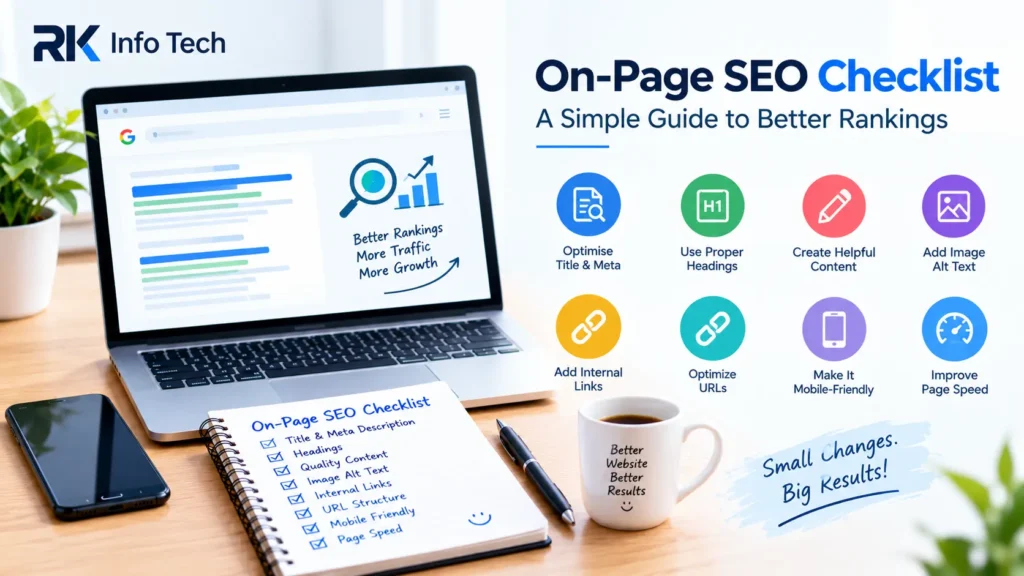
An On-Page SEO Checklist helps you optimise your website pages for search engines and visitors. It covers important elements such as titles, headings, content, images, links, and URLs.
Many businesses publish website content but forget basic SEO steps. As a result, their pages may struggle to reach the right audience.
On-page SEO helps search engines understand your content. It also makes your website easier for visitors to use.
In this blog, RK Info Tech shares a simple On-Page SEO Checklist that you can follow before publishing any website page or blog post.
What Is On-Page SEO?
On-page SEO means improving the elements within your website pages. The goal is to help search engines understand your content and provide a better user experience.
It includes optimising page titles, meta descriptions, headings, images, internal links, and content quality.
For example, a blog about digital marketing should have a clear title and useful information. Its headings should explain the main topics, and its images should have descriptive alt text.
Following an On-Page SEO Checklist helps you avoid missing important optimisation steps.
1. Choose the Right Focus Keyword
Start by selecting a relevant keyword for your page. Your keyword should match what people are searching for.
For example, a blog about website optimisation might target “website SEO tips.”
Before choosing a keyword, consider these points:
- Is the keyword related to your topic?
- Does it match the reader’s search intent?
- Can you provide useful information about it?
- Is it relevant to your business?
Use the keyword naturally throughout your content. Avoid repeating it unnecessarily.
You can also include related terms that help explain the topic.
2. Write an SEO-Friendly Page Title
Your page title helps users and search engines understand the page topic. It may also appear as the clickable title in search results.
Write a clear title that describes the content accurately.
Follow these tips:
- Include your main keyword naturally.
- Keep the title clear and relevant.
- Make it useful for readers.
- Avoid unnecessary keyword repetition.
- Give each page a unique title.
For example:
On-Page SEO Checklist: 12 Steps to Optimise Your Website
A good title sets clear expectations for the reader.
3. Optimise Your Meta Description
A meta description summarises the page content. Search engines may use it as the snippet shown in search results.
Write a short, useful description that encourages people to visit your page.
For example:
“Follow this simple On-Page SEO Checklist to optimise titles, headings, content, images, links, and other important website elements.”
Keep your description relevant to the page. Avoid misleading claims or unnecessary keyword repetition.
Google may generate a different search snippet depending on the user’s query.
4. Use Proper Headings
Headings organise your content into clear sections. They help readers scan the page and find information quickly.
Use one clear main heading, usually an H1. Organise major sections with H2 headings and smaller sections with H3 headings where appropriate.
For example:
- H1: On-Page SEO Checklist
- H2: What Is On-Page SEO?
- H2: Important SEO Steps
- H3: Optimise Your Images
Use headings to describe the content that follows. Do not add keywords to every heading just for SEO.
A logical structure makes long articles easier to read.
5. Create Helpful and Original Content
Content quality is one of the most important parts of on-page SEO. Your page should answer the reader’s questions clearly.
Write for people first. Avoid copying content from other websites.
Use simple language and short paragraphs. Explain difficult ideas with examples where helpful.
Before publishing, ask yourself:
- Does the content answer the main question?
- Is the information accurate and useful?
- Have I covered the important subtopics?
- Is the content easy to understand?
- Does it offer something valuable to readers?
There is no perfect word count for every page. Write enough to cover the topic properly without adding unnecessary text.
6. Use Keywords Naturally
Your focus keyword should appear where it makes sense. This may include the title, introduction, headings, and body content.
However, avoid forcing the keyword into every paragraph.
Use related terms naturally to provide context. For example, an article about on-page SEO may also discuss title tags, image optimisation, internal links, and page experience.
Read your content aloud before publishing. If the wording sounds repetitive, revise it.
Keyword placement should support clarity rather than make the article difficult to read.
7. Optimise Your Website URLs
A clean URL helps users understand what a page is about. It also makes website links easier to read and share.
For example:
Good URL: example.com/on-page-seo-checklist/
Avoid long URLs filled with unnecessary numbers or random characters.
Follow these simple rules:
- Keep URLs short and descriptive.
- Use words related to the page topic.
- Separate words with hyphens.
- Avoid unnecessary parameters where possible.
- Keep your URL structure consistent.
If you change an existing URL, set up an appropriate redirect to help users and search engines reach the correct page.
8. Add Descriptive Image Alt Text
Images can make your content more useful and engaging. Alt text describes an image for people who cannot see it and helps search engines understand its context.
Write short, accurate descriptions of meaningful images.
For example:
Image alt text: “Website SEO checklist showing page optimisation steps.”
Avoid stuffing keywords into image descriptions. Decorative images may not need descriptive alt text.
You should also use suitable image formats and compress large files.
Optimised images can improve accessibility and help pages load more efficiently.
9. Add Internal Links
Internal links connect one page of your website to another. They help visitors discover related information.
For example, a blog about on-page SEO could link to your SEO services page or another relevant blog.
Use descriptive anchor text that explains what the linked page contains.
Follow these practices:
- Link to relevant pages.
- Help readers find useful information.
- Avoid adding too many unnecessary links.
- Check that links work correctly.
- Use natural anchor text.
Internal links can also help search engines discover pages across your website.
10. Link to Reliable External Sources
External links can help readers find additional information. When relevant, link to trustworthy sources that support your content.
For example, an SEO article may link to official Google Search Central documentation.
Choose sources that are useful and directly related to the topic.
Do not add external links just to increase their number. Focus on helping readers understand the subject.
Check that your links lead to the correct pages and work properly.
11. Make Your Website Mobile-Friendly
Many visitors access websites through smartphones. Your pages should remain easy to read and navigate on smaller screens.
Check that:
- Text is readable without zooming.
- Buttons are easy to tap.
- Images fit the screen.
- Menus work correctly.
- Forms are simple to complete.
- Content does not cause horizontal scrolling.
A mobile-friendly design supports a better user experience. Google primarily uses the mobile version of website content for indexing.
Test your pages on different screen sizes before publishing.
12. Improve Page Loading Speed
Slow pages can frustrate visitors. A faster website helps people access information more comfortably.
You can improve performance by compressing images, reducing unnecessary scripts, and using efficient hosting.
Avoid adding too many heavy animations or plugins.
Use Google PageSpeed Insights to identify possible performance problems.
You can also review Core Web Vitals to understand loading performance, responsiveness, and visual stability.
Do not focus only on a single speed score. Prioritise improvements that help real visitors use your website more easily.
13. Optimise Your Content for Search Intent
Search intent means understanding what a person wants when searching online.
Some people want information. Others want to compare services or make a purchase.
Your content should match that purpose.
For example, someone searching for an On-Page SEO Checklist probably wants clear steps they can follow. A service page should instead explain your services, benefits, and contact options.
Review the questions your audience asks. Structure your content to answer those questions directly.
Matching search intent helps make your page more relevant and useful.
14. Add Relevant Calls to Action
A call to action tells visitors what they can do next. It may invite them to contact your business, explore a service, or read another article.
For example, RK Info Tech can add a clear enquiry button to a relevant SEO service page.
Keep your call to action simple and appropriate to the page.
Avoid overwhelming readers with too many competing buttons.
A useful next step can help visitors continue their journey through your website.
15. Check for Broken Links and Errors
Broken links can prevent visitors from accessing useful information. They may also create a poor browsing experience.
Before publishing, check your links and review the page layout.
Look for:
- Links that lead to missing pages.
- Images that do not load.
- Incorrect headings.
- Spelling and grammar mistakes.
- Forms that do not submit.
- Buttons that do not work.
You should also review existing pages regularly. Website updates can sometimes introduce new errors.
16. Review Your SEO Results
SEO is an ongoing process. Publishing a page does not guarantee that it will rank immediately.
Use Google Search Console to review search impressions, clicks, queries, and indexing information.
Look for pages that receive impressions but few clicks. Their titles or descriptions may need improvement, although other factors can also affect clicks.
Review pages that attract visitors but generate few enquiries. You may need to improve their content or calls to action.
Make changes based on useful data rather than assumptions.
On-Page SEO Checklist Before Publishing
Use this quick checklist before publishing a website page or blog.
- Choose a relevant focus keyword.
- Write a clear, unique page title.
- Add a useful meta description.
- Use a logical heading structure.
- Create original, helpful content.
- Include keywords naturally.
- Use a short, descriptive URL.
- Add suitable image alt text.
- Include relevant internal links.
- Check external links.
- Test the mobile layout.
- Review page loading performance.
- Check links, images, and forms.
- Add a relevant call to action.
- Review results after publishing.
This On-Page SEO Checklist can help you follow a consistent process across your website.
How RK Info Tech Can Help
provides digital marketing and website-related services to help businesses strengthen their online presence.
On-page SEO involves improving website content, page structure, titles, images, internal links, and user experience.
Our approach focuses on making website pages clearer, more useful, and better organised for visitors and search engines.
If you need help optimising your website, RK Info Tech can help you explore suitable SEO solutions for your business.
Conclusion
An On-Page SEO Checklist makes website optimisation easier to manage. It helps you review important elements before publishing a page.
Start with a relevant keyword, a clear title, helpful content, and proper headings. Then optimise images, links, URLs, mobile usability, and page performance.
Remember that SEO takes time. Keep your content useful and review your results regularly.
Following these steps can help create a better website experience and support your long-term SEO efforts.
Frequently Asked Questions
1. What Is an On-Page SEO Checklist?
An On-Page SEO Checklist is a list of tasks used to optimise individual website pages. It includes titles, headings, content, URLs, images, internal links, and mobile usability.
2. Why Is On-Page SEO Important?
On-page SEO helps search engines understand your content. It also helps visitors find information and navigate your website more easily.
3. What Are the Most Important On-Page SEO Factors?
Important factors include helpful content, relevant titles, clear headings, descriptive URLs, image alt text, internal links, and a usable website layout.
4. How Often Should I Check On-Page SEO?
Review important pages after major updates and whenever performance changes. You should also check older content regularly for outdated information and broken links.
5. Does Keyword Density Matter?
There is no single ideal keyword density for every page. Use your target keyword naturally and focus on answering the reader’s question without repetition.
6. How Long Should an SEO Blog Be?
There is no fixed word count that guarantees rankings. Write enough to answer the topic thoroughly while keeping the content useful and easy to read.
7. Do Images Affect On-Page SEO?
Images can support the content and improve accessibility when used properly. Descriptive alt text and compressed image files can also help with accessibility and performance.
8. Is Mobile-Friendly Design Part of On-Page SEO?
Yes, mobile usability is an important part of the overall website experience. A responsive layout helps visitors access content across different screen sizes.
9. Which Tools Can Help With On-Page SEO?
Google Search Console can help you review search performance and indexing. PageSpeed Insights can help identify website performance issues.
10. Can On-Page SEO Guarantee First-Page Rankings?
No. On-page SEO cannot guarantee first-page rankings. Search results depend on many factors, including content relevance, competition, technical performance, and other ranking signals.